


LifeSugar, the diabetes app for counting carbs from a photo
Everything goes into your diabetes diary, next to your blood glucose, insulin and exercise, and you can share it with your doctor.
One of the co-founders lives with type 1.
This November, on Android. The first 14 days are free. Then €7.99/month.
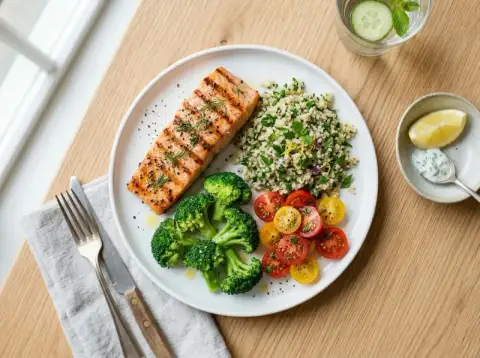
Salmon with quinoa
450 g · 1 plate
AI estimate · Glucy
See how LifeSugar works in one minute
From the photo of the plate to the diary you can share with your doctor.
Prefer to go screen by screen? App guide, step by step
Why counting carbs by eye doesn't work
You can't solve the equation
if you make up the numbers.
Without that number there is no insulin calculation. You already have the ratio; what's missing is the carbs on the plate.
Situations you face every day

Counting carbs in a restaurant
How many carbs are in this risotto?
The dish doesn't come with a label

Counting carbs in a home-cooked stew
How many carbs are in my mum's stew?
A recipe nobody weighed
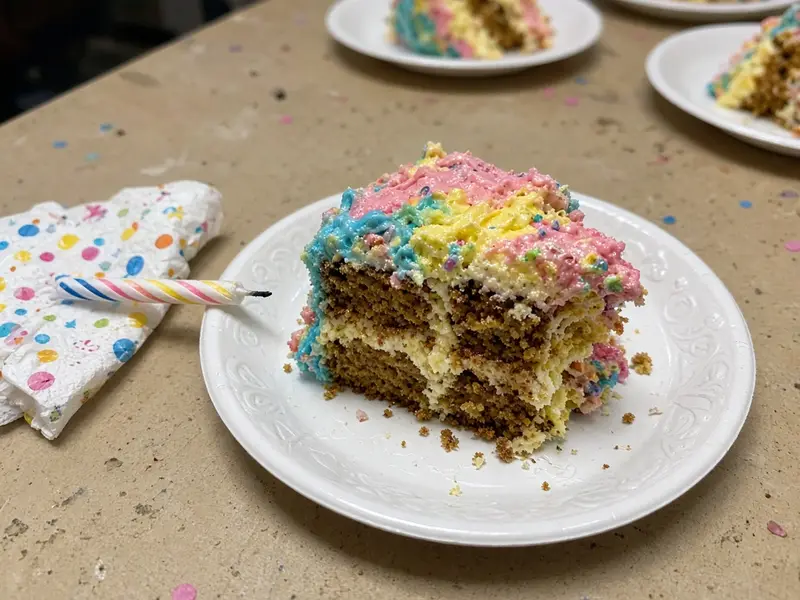
Counting carbs in a slice of cake
Is this slice 30 g or 50 g?
Margin of error: a hypo
That number exists. You just need to get it off the plate without weighing it.
How LifeSugar counts the carbs in a photo
Point at the plate. The number appears by itself.
Take a photo of the plate
Open the LifeSugar camera and point it at your meal, with the whole plate in the photo.
AI recognises the food and estimates the carbs
It recognises what is on the plate and estimates how much it weighs. No tables, no scales.

Glucy
Your diabetes assistant
Mushroom risotto
310 g · 1 plate
AI estimate · Glucy
Check and adjust the portions
It gives you the carbs and portions on the plate. You confirm with a tap and it is saved to your diary.
How accurate is AI from a photo? What the studies say
Counting carbs with scales versus counting them with LifeSugar
- Weigh the rice on the scales
- Look up the factor in a table
- Do the sums while it goes cold
- You point at the plate
- You check what it detected
- It's saved to your diary
A meal takes a minute. Diabetes lasts all day.
That's why the app doesn't stop at the photo: an assistant you can ask, a diary that gathers everything and a report your doctor or nurse understands.
Glucy, the LifeSugar assistant for your day-to-day questions
Ask Glucy whatever you like.
Unsure about your plate or your diabetes?
Glucy answers. At 3pm or at 3am.
Answers your questions
About your plate, your glucose or your HbA1c.
Add foods from the chat
Describe it in your own words and it goes into your diary.
Your foods and menus
Save dishes, build menus, with thousands already saved.
With clear limits
It will never tell you an insulin dose. That's for your doctor.
Glucy informs, it doesn't prescribe
It answers with educational, approximate information. Insulin, medication and diet are decided always with your healthcare team.
Glucy
Your diabetes assistant

Diabetes diary: meals, blood glucose, insulin and exercise in one place
A diary that fills itself in.
The diary brings together meals, exercise and blood glucose. Food goes in with a photo, with the barcode on the packet, or by searching among thousands of foods.
Log with a photo
You photograph the plate and the carbs go into the log. You don't copy them by hand.
Scan the barcode on the packet
You point the camera at the barcode and the product's carbs go in.
Search among thousands of foods
If it has no barcode, you search for it. The database already has the carbs per 100 g.
Exercise and blood glucose
In the same diary as your meals. One thread for the whole day, not three places.
Your doctor can see it
You give them access to the diary. If you don't, they see nothing.
Log meal
Share your diabetes diary with your doctor or nurse
The diary your doctor or nurse sees
What you ate, and your blood glucose before and after. A glucose meter report doesn't show the plate.
09:00Toast with olive oil
34 g carbs
Blood glucose before 95after 128mg/dL
14:10Mushroom risotto
60 g carbs
Blood glucose before 118after 164mg/dL
21:00Basmati rice and chicken
62 g carbs
Blood glucose before 126after 158mg/dL
What your doctor or nurse sees in the report
You give it to them, from the app. You see the same and can export it as CSV or PDF.
- How each meal starts and ends: blood glucose before and after, by time of day.
- What rise goes with each meal, according to its carbs.
- Your blood glucose: % in range, variability and early-morning lows.
- Your insulin, your exercise and the foods you repeat most.
- The days you log, on a calendar.
Medical notice. LifeSugar is a support tool, not a medical device. The diary doesn't suggest any regimen, doesn't calculate doses and doesn't judge any figure. Clinical decisions are made by your healthcare team; the estimates are approximate.
Privacy of your health data at LifeSugar
We don't sell your data. We just make the app.
Your health data is your business, not a product.
LifeSugar is designed with privacy by default and under the GDPR: we ask for the minimum, we show no ads and we don't sell your information.
No ads, no selling data
We don't sell, rent or share your data for commercial purposes. No ads, either during the trial or after it.
We ask for the minimum
You sign in with your Google account and your phone number. We don't access your location, your contacts or your messages. Your photos, only if you pick one from your camera roll, and with your permission.
Your photos aren't stored automatically
The photo is processed for the analysis and is not stored on our servers, unless you decide to save it in your diary.
Your data, your control
Download your history from the web dashboard and delete your account whenever you like. We comply with the GDPR and you can exercise your rights by email.
Let's be honest: to read your plate, the photo is analysed in the cloud with Google's AI (Gemini). It is a provider that processes the image on our behalf, not a buyer of your data — and under Google's business terms, that data isn't used to train its public models.
LifeSugar pricing
14 days free. Then €7.99 a month.
14 days free
€7.99/month
or €69.99/year, You save 27%
- AI meal analysis
- Diary of meals, exercise and blood glucose
- Dashboard for your doctor, which you grant
Waitlist. The 14-day trial starts when you activate it in the app. VAT included. No minimum term.
Frequently asked questions about LifeSugar
Carb counting, portions, privacy and pricing. Everything you need to know before you sign up.
Product
What LifeSugar is and who makes it
How it works
Photo, AI, portions and their limits
Launch
When it arrives and on which platforms
Pricing
A single plan and a 14-day trial
Privacy
What happens to your data and photos
Medical safety
The app's clinical limits
Can't find your answer?
Write to us and we'll reply ourselves — the same people who build the app.
Important medical notice
LifeSugar is not a medical device. The results are approximate and may contain errors. It does not replace professional advice. Never use the estimates to calculate insulin doses without first checking them with your healthcare team.

Join the LifeSugar waitlist
Start with your next meal. Stay for everything else.
We'll let you know when it reaches Android and you get 14 days free: counting carbs from a photo from day one.
The form opens in Google Forms, in a new tab.