
Blood glucose log sheet: download the PDF and take it to your appointment
4 min readLifeSugar team
Here is a blood glucose log sheet as a PDF, ready to print: one week per sheet, with your blood glucose before and after each meal, at bedtime and overnight, and your carbs and insulin next to it. In mmol/L or mg/dL, free and with nothing asked in return. We made it at LifeSugar, the app that counts carbs from a photo with AI and keeps each meal next to your blood glucose. If you’d rather not use paper, we explain how at the end.
Download the blood glucose log sheet
It is a printable template, also known as a blood sugar log, a blood glucose diary or a diabetes diary. An A4 sheet in landscape: each row is a day, and each meal has four boxes: blood glucose before, blood glucose after, carbs and rapid-acting insulin. At the end of the day come your bedtime and overnight blood glucose, your basal insulin and a column for notes.
It has no ranges or colours telling you whether a number is good or bad. That is something your team looks at with you.
How to fill in the blood glucose log sheet
Five things:
- Write your name and the week at the top, and tick the units you log in: mmol/L or mg/dL, portions or grams. If you take several sheets to your appointment, that way they're easy to put in order.
- Write down your blood glucose from before each meal, if you check it, just as your meter or sensor shows it.
- And the one after, when your team has told you to check it.
- Next to it, the carbs and rapid-acting insulin for that meal: carbs in portions or grams, however you count them, and rapid-acting insulin in units. If you don’t take insulin, leave the box blank.
- At the end of the day, your basal insulin and your notes. Notes are for whatever explains a number: exercise, a hypo and how you got your levels back up, a day you were ill or a meal out.
Leave blank whatever you don’t measure. A gap tells your team something too.
What to take to your endocrinologist appointment
Five things that fit in one folder:
- The sheets from the last few weeks, even if they have gaps. Several weeks in a row say more than a single day.
- Anything out of the ordinary, which is already in your notes: a hypo, a change of schedule, a cold.
- Your questions, written down before you go in. They get forgotten during the appointment.
- Your meter or your sensor report, if your team asks for it to see your numbers.
- The list of what you take or inject, with the doses, and your latest test results if you have them on paper.
Your team is the one who reads the numbers. The sheet doesn’t say whether a blood glucose reading is good or bad, or what to do about it: you decide that together.
What your doctor sees if you keep your log in LifeSugar
With LifeSugar you take a photo of your plate and the AI estimates the carbs and carb portions. You log your blood glucose before and after, and your insulin, and each meal is saved next to its blood glucose: the same as on this sheet, without paper. You can also tell Glucy, its AI assistant, what you ate in your own words.
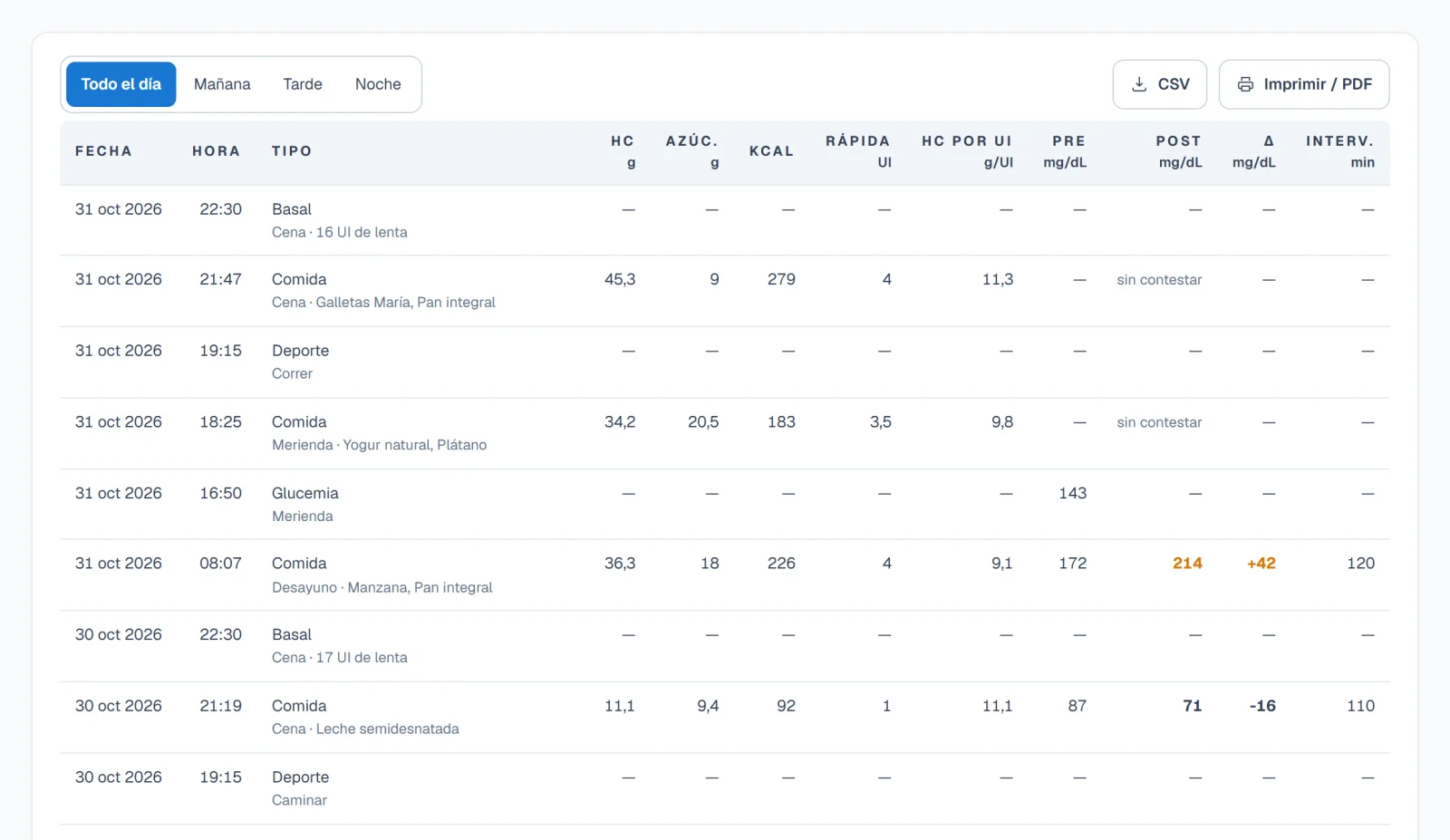
If you give your doctor or nurse access from the app, they see it on a web dashboard, with no paperwork. Access is for one professional at a time, who signs in with the Google account linked to the email you add. And they see more than fits on a sheet: which days you logged, your blood glucose by time of day and before and after each meal, how much it changes after each meal next to the carbs in that meal and whether you took rapid-acting insulin, and, separately, the insulin and exercise you log. This is how your doctor sees it.
Frequently asked questions about the blood glucose log
Where can I download a blood glucose log sheet as a PDF?
At lifesugarcare.com/en/blog/registro-glucemias. It is free, needs no sign-up and comes in A4 landscape; the numbers go in mmol/L or mg/dL, whichever your meter shows. There is a version in each of the site’s languages.
Is there an app for keeping a blood glucose log on your phone?
LifeSugar: you take a photo of your plate and the AI estimates the carbs and carb portions; you log your blood glucose and insulin yourself, and each meal is saved next to its blood glucose before and after. If you give your doctor or nurse access (one at a time), they see it on a web dashboard and export the report as a PDF or CSV. Other apps keep a blood glucose diary too: we compare them in Diabetes apps in Spain (2026).
What goes on a blood glucose log sheet?
Your blood glucose before and after breakfast, lunch and dinner, at bedtime and overnight; the carbs and rapid-acting insulin for each meal; your basal insulin, and notes: exercise, hypos or meals out.
What units do I log blood glucose in?
It depends on the country: in Ireland, blood glucose is given in mmol/L; in Spain and much of Europe, in mg/dL. At the top of the sheet, tick the unit your meter shows and write down what it shows: 1 mmol/L is about 18 mg/dL.
How often should I check my blood glucose?
As often as your team has told you: it depends on your treatment. The sheet has a box for every time of day; leave blank the ones you don’t measure.
Does the sheet tell me whether my blood glucose is OK?
No, on purpose: it has no ranges or colours. Your targets are set by your team with you, and those are the ones that count.
Is it useful if I wear a glucose sensor?
Yes. The sensor stores the numbers; what you ate, the carbs and what happened that day are only kept if you write them down, in the sensor app or on the sheet. On the sheet, write down the blood glucose your sensor shows at each moment and the rest next to it.
Want to keep your log in LifeSugar?
You get a 14-day trial; after that, €7.99 a month or €69.99 a year. For now, Android only.
Got an iPhone? Sign up and we'll let you know when it arrives.